
Free shipping on orders over $80

Wishlist

Your cart

A real WooCommerce shop, built entirely with Etch

Every price, rating, cart and checkout on this site is a Fancy Etch component.

Browse the shop

See it working

Browse the shop

Six products, each one here for a different reason. Open any of them and the product page shows it — the same components you place in the builder, with WooCommerce behind them.

  • Canvas Sneaker
    • Up to −25%
    • Out of stock
    • On backorder
    • Featured

    4.3 out of 5 (3 reviews)

    Canvas Sneaker

    $44.00 – $59.00Regular priceSale price
    Select options

    Colour and size on the card itself, and the photo follows the colour you pick. Its page adds three photos and a sale price.
    • Variation Picker
    • Product Gallery
    • Product Price
    • Add to Cart
  • Piqué Polo
    • Up to −25%
    • Out of stock
    • On backorder
    • Featured

    3.5 out of 5 (2 reviews)

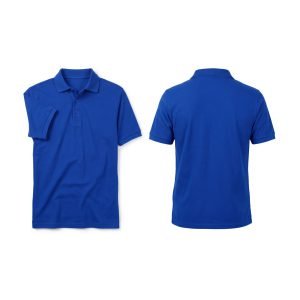
    Piqué Polo

    $24.00 – $32.00Regular priceSale price
    Select options

    Four photos: thumbnails, zoom while the pointer is over them, and a lightbox that also works with the keyboard.

    • Product Gallery
    • Variation Picker
    • Product Reviews
  • Cap
    • Up to −11%
    • Out of stock
    • On backorder
    • Featured

    3.5 out of 5 (4 reviews)

    Cap

    $16.00Regular price$18.00Sale price$16.00
    Add to cart

    What it cost, what it costs now, and the discount worked out on the badge. Four reviews with their stars further down.

    • Product Price
    • Product Badges
    • Product Rating
    • Product Reviews
  • A grouped product: several things, each with its own quantity, added to the cart in one go.
    • Add to Cart
    • Product Price
  • Rain Jacket
    • Up to −%
    • Out of stock
    • On backorder
    • Featured

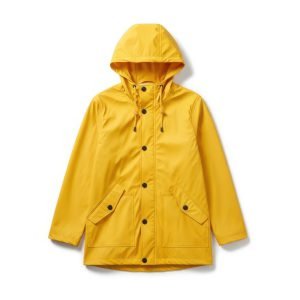
    Rain Jacket

    $75.00Regular price$75.00Sale price
    Read more

    Out of stock, said on the card and on its page, with a button that says so instead of failing. Travel backpack does the same for backorder.

    • Stock Status
    • Product Badges
    • Add to Cart
  • Sold somewhere else: the button leaves for the other shop, and nothing is added to this cart.

    • Add to Cart
    • Product Badges

The shop's reviews, anywhere

View more

A testimonials section on the home page, a strip of reviews in the footer, the best comments on a landing page: there is no component to place, and none is needed. The plugin publishes the whole shop's reviews as a list, on every page, and an Etch Loop draws them with the card you design. That carousel is a loop inside the Fancy Slider.

Rated 4 out of 5

Comfortable from the first day. I went for my usual size and it fits.

Rated 4 out of 5

Donec eu libero sit amet quam egestas semper.
SuperCoudixCap

Rated 5 out of 5

Slim and well made. The leather is already darkening nicely.

Rated 5 out of 5

Stiff at first, perfect after a month. Exactly what I wanted.

Rated 4 out of 5

Nice fabric. The yellow is brighter than on screen.

Rated 5 out of 5

Beautiful leather. Took a few days to soften, now I live in them.

Rated 4 out of 5

Good sneaker. The white gets dirty fast, as white does.

Rated 5 out of 5

Comfortable from the first day. I went for my usual size and it fits.

Rated 5 out of 5

Pellentesque habitant morbi tristique senectus et netus et malesuada fames ac turpis egestas. Vestibulum tortor quam, feugiat vitae, ultricies eget, tempor sit amet, ante. Donec eu libero sit amet quam…

Everything in the box

28 components, in the same eight groups the builder’s panel uses. Place a whole one — the cart, the checkout, the filters — or its pieces, one by one, wherever the page needs them.

Shop

  • Product Gallery
  • Product Badges
  • Product Price
  • Product Rating
  • Stock Status
  • Variation Picker
  • Add to Cart
  • Product Reviews

Catalog

  • Breadcrumb
  • Catalog Bar
  • Catalog Pagination

Filters

  • Catalog Filters
  • Price Filter
  • Color Filter
  • Attribute Filter
  • Rating Filter
  • Category Filter

Search

  • Search

Cart

  • Cart
  • Cart Items
  • Cart Coupon
  • Cart Totals

Mini cart

  • Cart Count
  • Mini Cart

Checkout

  • Checkout
  • Checkout Form
  • Checkout summary

Account

  • Account

From the card to your account

Add anything to the cart and follow it through. Every step below is built with the module’s components; the totals, the stock and the payment are WooCommerce’s own.

  1. Add to cart

    From a card in the catalogue or from the product page: the quantity, the variation that was picked, and an answer without reloading anything.

    • Add to Cart
    • Variation Picker
  2. The mini cart

    The drawer in the header opens with what just went in, and the counter beside it carries the total from page to page.

    • Mini Cart
    • Cart Count
  3. The cart

    Lines with their photo and their quantity, a coupon, and the totals with shipping and tax as this shop has them set.

    • Cart
    • Cart Items
    • Cart Coupon
    • Cart Totals
    Open the cart
  4. The checkout

    WooCommerce’s own form, re-skinned: address, shipping method, payment, and the order beside it while it is filled in.

    • Checkout
    • Checkout Form
    • Checkout summary
    Go to the checkout
  5. Your account

    Orders, downloads, addresses and details, in whichever page the shop has set as its account page.
    • Account
    Open the account